
Make Routine Law Firm Work Easier with Power Automate
Plan simple workflows for enquiries, document approvals and internal reminders, with clear permissions and a human review step where needed.
Save or follow this source
Add AdvocateRahulDev.com to Google Preferred Sources or open this page in your preferred AI tool.
- Map a clear trigger and approval owner
- Control connector permissions and sensitive data
- Test exceptions before wider rollout
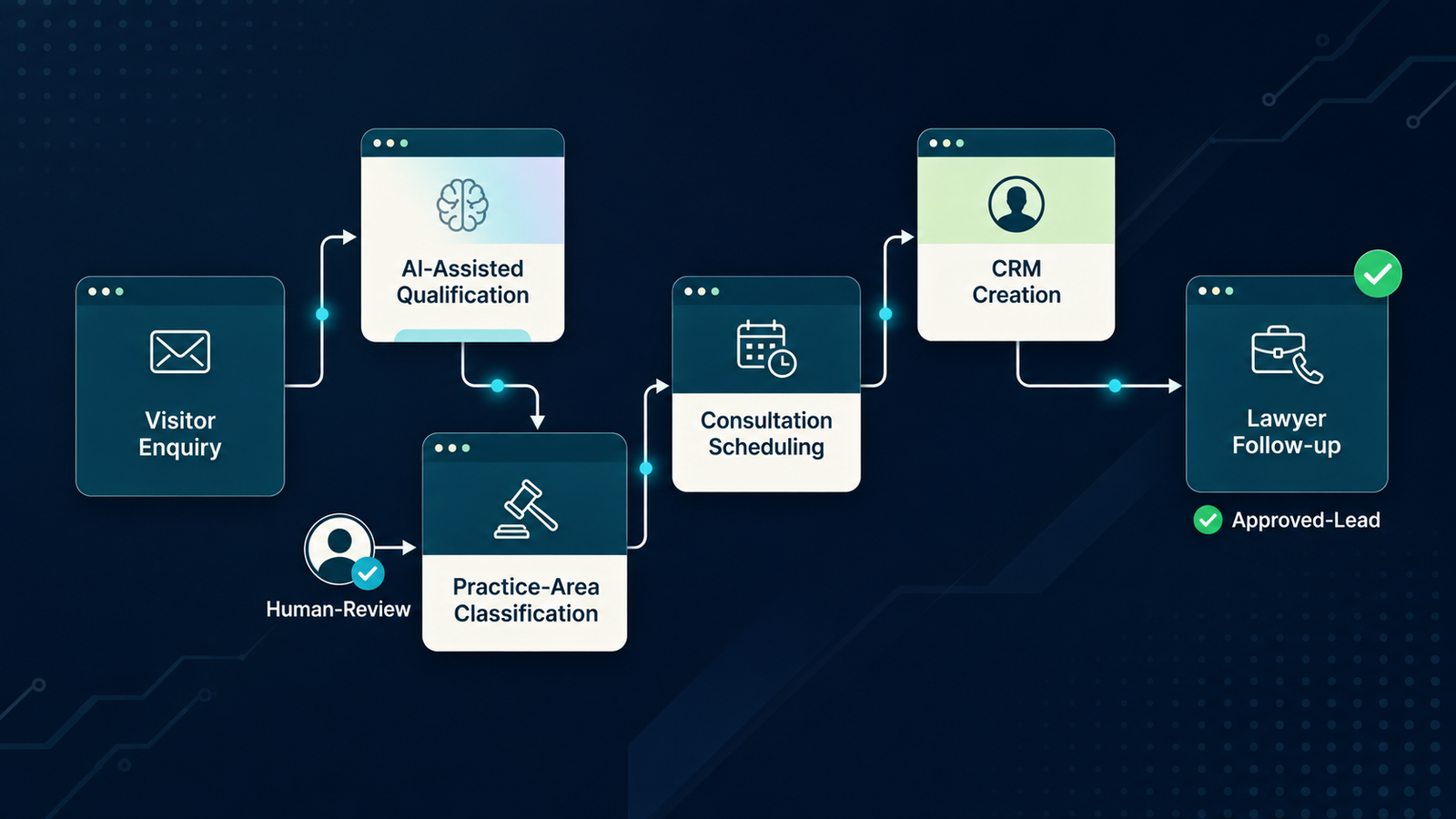
Would This Fit Your Legal Work?
Bring one specific workflow and the safeguards your team needs. The next conversation should identify what can be evaluated and what must remain under professional review.
Review Our Law Firm Automation WorkflowWhat Could Work Better for Your Team?
Plan simple workflows for enquiries, document approvals and internal reminders, with clear permissions and a human review step where needed. This page focuses on Cross-system automated routing and controlled legal operations workflows, not general Copilot legal drafting. It is an independent educational analysis and does not imply official provider affiliation or a completed implementation by the publisher.
How to Make a Careful First Decision
Choose a real task
Define one process, the decision owner, authorized source materials and expected result.
Check access and safeguards
Verify current product features, configuration, permissions and professional obligations.
Test and review
Use a bounded example, inspect the primary evidence and document unresolved concerns.
Plan a Small, Supervised Trial
Test with cleared examples, current product access and a named reviewer. Record which functions and permissions remain uncertain.
Review Our Law Firm Automation WorkflowTechnology and Legal Practice: An Overview
The video introduces general technology considerations. The product-specific evidence and limitations are set out in the cited research below.
Power Automate for Law Firms: Intake, Approvals and Data Controls: Independent Research Guide
Author: Dr. Rahul Dev: PhD Data Scientist, Technology Law & Patent Attorney, and AI Educator with 20+ years advising global CEOs and CXOs on tech, business, and legal innovation. Author profile · Contact
Research reviewed: 29 October 2026. Product and regulatory information must be rechecked before implementation.
Direct answer
Start by defining the legal team's actual task, its approved source material, authorized users and required review. Verify product capabilities against official documentation and the firm's configuration. Use realistic tests that include missing evidence and confidentiality risks, then document the professional decision before relying on any result.
- Start with one repetitive hand-off
- Understand how connectors move information
- Define data-loss prevention controls
- Design approvals that retain professional judgment
- Handle deadlines and matter identifiers carefully
- Protect confidentiality and access rights
- Build exception and fallback handling
- Pilot with a simple end-to-end example
- Keep automation separate from AI adoption
- Document maintenance and ownership
Start with one repetitive hand-off
A useful automation begins where one staff member repeatedly transfers information or asks for a routine approval. Examples include logging a new enquiry, acknowledging receipt of a document, routing an internal task or reminding an authorized reviewer about an upcoming deadline. Identify the trigger, source system, destination, user consent where relevant and the person accountable for the result. Draw the workflow before choosing connectors. A client enquiry containing confidential facts should not be broadcast to a general collaboration channel merely because that action is easy to configure. Define the expected response when fields are missing, multiple records share a name or a request arrives outside working hours. The goal is a reviewable business process, not an invisible chain of automated actions.
Understand how connectors move information
Power Automate can connect supported business systems through connectors and APIs, but a connector is a data access route, not proof of legal-system compatibility or permission. Record each integration endpoint, service account, field mapping and data type. Check whether the destination belongs to the same organization, a third-party vendor or an external client, and whether the connection uses the correct identity. Microsoft documents data policies that administrators can use to govern how connectors are combined and what data routes are allowed. Those policies require design and maintenance. A firm should test each connection using controlled example records before introducing client files. When an essential target system lacks an authorized integration, the project must stop or use a separately reviewed approach, not improvise unapproved copying. Relevant source: Microsoft Learn, Power Platform data policies.
Define data-loss prevention controls
Microsoft's Power Platform and Power Automate documentation explains connector grouping and data-loss prevention policies. These can help reduce unintended transfer of information between business and non-business systems. The relevant administrators must configure and test the actual environment; a policy shown in a tutorial does not show the firm's policy is in force. Create a connector inventory with permitted, restricted and prohibited destinations and identify who may change classifications. Include desktop automation actions where applicable. Test intentionally disallowed combinations to verify that controls actually block the flow. Record exceptions and approval dates. A policy can also disrupt a legitimate workflow, so evaluate the consequences of suspension and define a safe manual fallback instead of disabling a control without review. Relevant source: Microsoft Learn, Power Automate data loss prevention policies.
Design approvals that retain professional judgment
Automating a reminder is different from approving a legal opinion, settlement, filing or confidential disclosure. For legally consequential steps, the automation should create a task for a named professional, present the underlying record and require a visible approval or rejection. Store the decision with enough context to reconstruct why it was made. Consider dual approval where separate legal and operational interests are involved. An automated action should not imply that an AI model has assessed legal merits unless a distinct, validated AI component exists and is supervised. A flow can route a document for contract review; it cannot by that fact alone guarantee compliance or correct legal interpretation. Distinguish administrative convenience from legal decision authority throughout the page and service offer. Relevant source: American Bar Association, Formal Opinion 512 (29 July 2024).
Handle deadlines and matter identifiers carefully
Matter numbers, client identities and deadlines often appear in different systems using inconsistent formats. Before automation, define the authoritative identifier and reconciliation rules. Test duplicate matters, renamed contacts, cancelled events, changed deadlines, time zones and out-of-office handovers. A reminder based on a manually entered date should display the source and the responsible owner, not masquerade as a verified court deadline. For court submissions, calculate dates using current procedural rules and professional review, rather than trusting a generic flow formula. Keep a manual method for urgent cases when a connection fails. Record whether the automation delivered, acknowledged and escalated each relevant notification. Treat silent failure as a design risk, not merely an IT support inconvenience.
Protect confidentiality and access rights
A flow may copy data from a privileged email into a shared list or send a document link to a user with broader access. Start by classifying client information and checking source and destination permissions. Identify where flow run histories, logs and error messages might expose sensitive content. Consider whether the service account has more privileges than the human user and whether those privileges are justified. Use the firm's approved data-handling procedures, retention rules and incident response route. For U.S. and SRA-regulated contexts, applicable professional guidance emphasizes competence, confidentiality and supervision; other jurisdictions require separate review. The design should show how sensitive information is limited to authorized persons at every step, including error handling and support troubleshooting. Relevant source: Solicitors Regulation Authority, Misuse of AI warning (17 August 2026).
Build exception and fallback handling
Every automation needs conditions under which it should stop, retry, alert a responsible person or return to manual work. Define these conditions before implementation. An enquiry with no contact details may need a manual review queue; a duplicate document should not trigger multiple external messages; and an API outage should not silently mark a legal task complete. Test expired credentials, missing connectors, unexpected file formats, large attachments and user accounts that have been disabled. Record the event in a way that permits investigation without unnecessarily exposing confidential content. A good exception process identifies the work that remains undone and assigns it to an accountable person. This is especially important where the workflow controls client intake or time-sensitive activity.
Pilot with a simple end-to-end example
Begin with a low-risk internal demonstration using invented client names and non-sensitive documents. Draw a process from a trigger through validation, permission check, approval, communication and record update. Include a negative test that must not send data to an unauthorized recipient. Compare the automated result with a manual reference process. Capture process reliability, wrong-route incidents, correction effort and user comprehension rather than asserting an unmeasured productivity benefit. When moving to a controlled trial, obtain approval for the actual systems and data classes. Preserve flow definitions and test records so another reviewer can reproduce the results. A pilot should demonstrate both what works and how the process fails safely.
Keep automation separate from AI adoption
Power Automate can run rule-based workflows without generative AI. Some implementations may connect to AI services, but their behavior must be separately assessed. A flow that copies an approved template between systems is not evidence of an intelligent legal assistant. If a generative component summarizes a client message, add a distinct evaluation for accuracy, bias, source transparency, confidentiality and human review. Avoid calling every automation an AI agent. Buyers seeking document redlining inside Word should read the Microsoft Copilot legal skills guide, while firms seeking role-based AI training need an adoption plan. This distinction matters for search intent, buyer expectations and claims about what the proposed service actually delivers. Relevant source: Microsoft Learn, Power Automate data loss prevention policies.
Document maintenance and ownership
A useful automation needs maintenance after its initial launch. Record the person who owns the process, the administrator who maintains connectors, a backup owner and the triggers for re-testing. Changes to third-party APIs, authentication, folder permissions, office procedures or law may require new checks. Keep a versioned workflow definition, change log and rollback instructions. If the system becomes unavailable, affected staff should know the manual route. Review whether connected tools have introduced new fields, broader permissions or changed retention behavior. A reliable legal workflow is one whose actions can be observed, corrected and explained. Avoid claiming continuous monitoring or guaranteed uptime unless there is a documented operational service and relevant agreement.
Illustrative Review Scenarios
These are hypothetical exercises, not verified vendor outcomes or client case studies.
Intake routing
A test enquiry mentions a conflict-sensitive client name. The flow routes the message to a controlled review queue rather than sending details to a broad group.
Document approval
A contract is routed to a lawyer, but the flow waits for an explicit human approval before moving to the next stage.
Disabled connector
A flow stops after a credential expires. The incident record identifies the pending task and activates a manual fallback.
Choose the Guide That Matches Your Decision
| Decision | Related page | Why it differs |
|---|---|---|
| Individual lawyer use | /insights/legal-ai-mcp-integrations/ | Personal task and document verification |
| Related work | /insights/ai-client-intake-matter-triage/ | Adjacent decision with different product or operating requirements |
| Tool discovery | /insights/legal-ai-tools-for-law-firms/ | Broader comparison and adoption questions |
These distinctions explain page purpose rather than implying performance superiority or vendor endorsement.
Frequently Asked Practical Questions
Is Power Automate the same as an AI agent?
No. Many flows use rules and connectors without generative AI.
Can connectors access any client data automatically?
Only when technically configured and legally authorized; permissions and policies require review.
Can an automated flow approve legal advice?
Legal conclusions and other consequential decisions require responsible professional judgment.
Sources, Scope and Limitations
The links below substantiate the provider's published feature descriptions and relevant professional duties. They do not establish availability in every account, compliance in a specific firm or the accuracy of model output. No rankings, search volumes, client results or affiliations are claimed.
- Microsoft Learn, Power Automate data loss prevention policies — Connector classes and flow-level policies can restrict data sharing, but configuration must be verified.
- Microsoft Learn, Power Platform data policies — Power Platform data policies provide connector governance; do not imply zero risk.
- Microsoft Learn, Manage Copilot for legal — Tenant administrators govern Word legal skills and Cowork plugins in different settings.
- American Bar Association, Formal Opinion 512 (29 July 2024) — US professional guidance; obligations depend on relevant rules, facts and jurisdiction.
- Solicitors Regulation Authority, Misuse of AI warning (17 August 2026) — Applies to SRA-regulated firms and practitioners in England and Wales; distinguish from global law.
- NIST, AI RMF Generative AI Profile — Voluntary risk-management reference, not a mandatory global legal code.
Related Research and Next Steps
Follow the links that match your specific professional task, platform or governance decision.
Discuss Your Next Practical Step
Explain your team, jurisdiction, existing software and the relevant decision so that any assessment stays appropriately scoped.
Review Our Law Firm Automation WorkflowAbout Dr. Rahul Dev
Dr. Rahul Dev is a PhD Data Scientist, Technology Law and Patent Attorney, AI Educator, and international business advisor with more than 20 years of professional experience. His work spans artificial intelligence, emerging technology, intellectual property, digital growth, technical research, and business strategy. Read the author profile.